As a frequent "Googler" I tend to search everything I need to search and Google has made it really simple over the years to perform searches  across a variety of categories like web, images, news, books, maps, etc. The feature of Google products is increasing and they make some changes that are often noticed by people. But these features will help you out when you are searching for a specific thing.

Yesterday I saw a post  on Facebook by Dropbox wishing happy birthday to Carl Sagan.


So I opened a new tab to search the birthday of Carl Sagan and started typing and I stopped at "birthday of" and I saw something that I have never seen before. The birthday dates were displayed directly on the instant search and it is cool. On some search results the exact age was also displayed.


 But the feature is not fully functional which means it does not display for everyone but for some specific people.So do you think the feature is cool and have you tried it out? Let us know in the comments below.
Hello readers, today we are starting the day with a new and exciting post. If you have a laptop or desktop with decent specs then you are probably running Windows 10. Windows 10 runs apps and programs smoothly and has improved on all factors then the previous versions of  Windows. But in this post I am not going to talk about Windows 10 nor does the features it offer. Instead we are going to experience Windows 1.01 on the browser. You may choose to install Windows 1.01 on your PC but its a pain in the **s. A post at gHacks links to all the websites where you can experience classic Windows versions. PCJS.org has managed to virtualize the Windows 1.01 platform.


This is an IBM PC XT Model 5160 JavaScript-based emulator. PCJS basically emulates the software entirely with Intel 8088 CPU clocked at 4.77 MHz and 256KB of RAM and 10MB Hard Disk using the original IBM PC Model 5160 ROM BIOS and CGA font ROM.


Windows 1.01 was introduced in 1985 that is 30 years before and was the starting point which introduced multitasking and included a set of features and programs like notepad,calculator,clock,paint,etc which we still use in the recent versions of Windows.


Windows 1.01 on the browser is possible due to the power and flexibility of Javascript. You can also experience other windows versions as well like Windows 3.0, 95 and Me.


I hope you like the post and if you know or heard about any such interesting stuff be sure to it in the comments below so that it keeps our audience engaged and we are excited to hear from our audiences. And don't forget to experience Classic Windows versions.


LINKS : 


CLICK THE IMAGE TO GO TO GIVEAWAY


Apple announced the Watch with much fun fare and as an apple user you may be quite excited to get your hands-on and try this device. You may be a die hard fan of Apple products and may be you  are planning to buy the apple watch. But the Watch launched as a premium product rather than a consumer product. And likewise you know just like the "cheapest" iPhone 5c the Watch is also costly. So in this post I decided to tell you guys whether you should buy the Apple Watch or just be satisfied with the "Quartz" watch you have.


Apple always stays ahead of the other companies by offering premium crafted devices which both perform great and look great. Apple has also done this with Watch by crafting its screen in sapphire and offering different versions like Sport, Edition for different sets of people. Watch is customisable with different colour bands making it even more beautiful for different occasions. But the main problem lies in the pricing of the Watch which starts from at a lower price and goes all the way up to $10000.


As shown in the above picture, the expected price of watch in India is around Rs.25000 which is mentioned in the website of www.mysmartprice.com. So anyone living in India can opt for other options like the Moto 360 or the other android smartwatches if they find the Apple Watch expensive. The Android smartwatches are way more cheap and offers great functionality combined with the sweet ui of lollipop. And to add to that you could just hack into your Android Wear to work it with the iPhone.

I am pretty sure you wont hack into an Apple Watch as it is more secure and anyways who wants to hack a $10000 watch? So this is the conclusion part - If you own an android phone and want a compatible watch buy watches powered with Android and if you own a iPhone and a die hard fan of Apple products and if you can shell out thousand dollars for a premium watch opt for the Apple Watch.

If you ask me what I would do I will neither buy the Android smartwatches nor the Apple Watch. The evolution of smartwatches have just begun and I will wait for a year for the smartwatches to become more "smart".


So did you like the post? Want to share with us your thoughts? Tell us in the comments below.


It's not a stretch to imagine that Motorola would release a follow-up to its affordable Moto E handset, after all the Moto G and Moto X have both been refreshed.
But now we can do more than just imagine as the first hints of a new Moto E / Moto E2 or whatever it ends up being called, have now emerged.
Greek site Techmaniacs.gr claims to have been hands on with the phone and is reporting that the main change is that it has a larger 4.5-inch display but with the same 540 x 960 resolution.
That sounds similar to the upgrade made with the second generation Moto G, which also received a boost in screen size but not resolution.

It's a G on the inside

Internally the new Moto E will apparently be very similar to the original Moto G. The site claims that it will "probably" have a Snapdragon 400 processor and 1GB of RAM, but is unable to confirm either of those details.
It will also supposedly have a 5MP camera with no flash, just like the current Moto E, however the new model will apparently support 4G, which the current one doesn't.
The design is said to be similar to the current model too, with a thick build but a good amount of grip. Finally the site claims that it will run Android 5.0, is very responsive, will be very cheap and is likely to be announced soon.
That all sounds fairly believable, and roughly matches up with a Geekbench listing from last month, which showed an unannounced Motorola handset as having a quad-core Snapdragon 410 processor and 1GB of RAM. Unfortunately though the site wasn't able to snap any images of the phone to back up its claims, so as always we'd take them with a healthy helping of salt.


                                          LIKE US ON FACEBOOK
                                         
Oculus Nimble Tech
Oculus VR's latest virtual reality prototype Crescent Bay is so immersive, it's disconcerting to raise your hand in front of your face and not see it rendered in the digital world. Cracking the problem of VR controls is one of Oculus' biggest remaining challenges, so it's not too surprising to see Oculus scoop up Nimble VR, a startup that's been working on hand tracking for the Oculus Rift.
Nimble has been working on hand tracking with 3D camera technology (think Kinect) since 2012, and today they ended an already-funded Kickstarter campaign to join the team at Oculus. Oculus VR also hired 13th Lab, a team "focused on developing an efficient and accurate real-time 3D reconstruction framework" for modeling real-world locations. Cities, the Egyptian pyramids, etc.
Nimble's hiring will likely affect Oculus hardware, while 13th Lab's hiring will more likely affect software, like the video games Oculus is developing in-house, or virtual tourism applications that create 3D models of real environments. Both are exciting, but we're especially interested to see whether Nimble's 3D depth camera is integrated into the eventual Oculus consumer model.
Nimble's Kickstarter was for a new camera the company developed called the Nimble Sense. Nimble developed the camera after working on software for existing 3D cameras, including the Kinect. Their camera offered a 110 degree field of view for capturing hand movements. Check out the prototype in their Kickstarter video. It's impressive stuff.
The video shows a couple gameplay demos, like cutting and re-fusing alarm wires by hand and a simpler demo of manipulating and rolling dice. Nimble also has a gameplay demo that lets the player blast lightning out of their hands to zap enemies.
Those demos show the potential Nimble has for simple game interactions. Latency, which is 20 ms according to GI.biz, doesn't look like much of a problem. 

                                                     LIKE US ON FACEBOOK
                                                 
Using the pre-installed VMware images of Mac OS X is always convenient rather than installing, patching and setting up other requirements manually. As this blog covers topic of OS X with desktop virtualization software on PCs, this guide shows how to install and run OS X 10.9 Mavericks VMware image on Windows 8 and 8.1 (supports Windows 7 too) Intel processor based computer.
Update – I have published a new guide with latest OS X 10.9 Mavericks retail VMware image here. It’s highly recommended to read the guide to get download links of retail image and installation guide.

Sysprobs had already published a guide about installing OS X 10.9 from original dmg file on VMware.

OS X 10.9 Mavericks VMware Image.

1)      Download OS X 10.9 VMware image from torrent or other download sites.
2)      As I mentioned earlier, if it contains only virtual machine configuration and virtual hard disk file, thenVMware unlocker needs to be downloaded separately.
4)      Make sure that after using unlocker patch you could see Apple Mac OS X guest as shown below.
 os x guest
5)      After extracting the downloaded content, attach it to VMware workstation.
You can go to File –> Open and browse the VMX file which is the configuration file of virtual machine.
6)      Before switching on, you could modify the hardware settings of VM. For example, processor numbers (cores) and RAM size if the physical computer hardware resources allow to do .
7)      Power on OS X 10.9 VM now.
8.)      Remember, if the VMware unlocker patch had not been applied (or failed), then you will be seeing the Apple logo with loading screen for long time.
Most of the people just download the image and execute it without applying unlocker patch (which is not included in most of the torrent downloads).
Therefore, make sure that patch is working fine and you are seeing Mac OS X OS as guest.
Within couple of minutes virtual machine will boot in to Mavericks desktop.
9)      VMware tools (Darwin.iso) is already installed, so no need to worry about it.
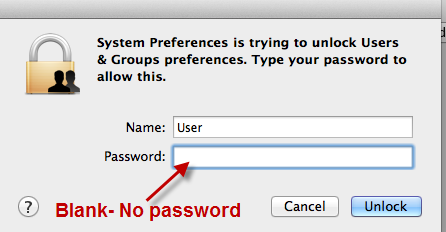
10)   The password for default root user ‘User’ is blank, means no password.
no password
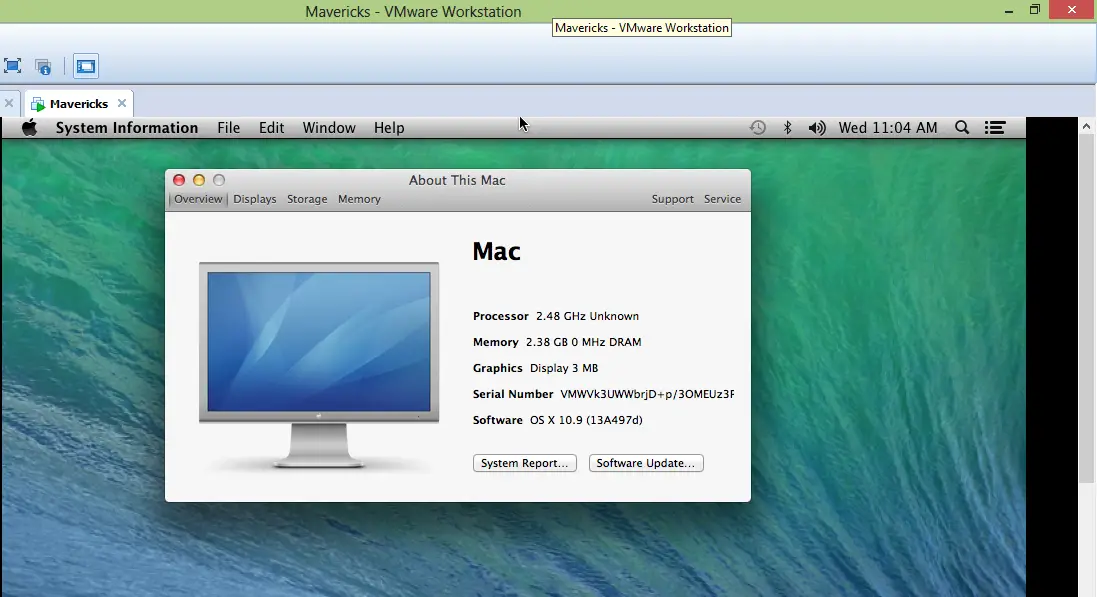
There you go, you have the latest OS X 10.9 on your Intel based computer with VMware workstation. Always hackintosh versions do not work as running on real Mac physical computer. So, you will have limited usage on virtual machine which is fair enough to test, experiment and play around with OS X.
running 10.9 vmware image
This installation can be updated to Mavericks 10.9.1 or 10.9.2 or even 10.9.3 with combo update. Since vanilla kernel is used in this pre-installed VMware image you will not face any issues by updating to latest OS X versions. But I highly recommend to take a snapshot of virtual machine before update.
I hope this guide would be helpful in running OS X 10.9.2 on Windows 8 or 8.1 by pre installed VMware image.
                                          LIKE US ON FACEBOOK